Jumat, 13 Desember 2013

Assignment Discovering Computer 2011 - Chapter 7 Storage

Assignment from Mr. Tri Djoko Wahjono, Ir., M.Sc.
Name : Tommy Hendrawan
NIM / Class : 1701309513 / 01PCT
Assignment : Discovering Computer 2011 - Chapter 7 Storage


1. How Are Storage Devices Different from Storage Media?
A storage medium is the physical material on which a computer keeps data, instructions, and information. The number of bytes (characters) a storage medium can hold is its capacity. A storage device is the computer hardware that records and/or retrieves items to and from storage media. Writing is the process of transferring items from memory to a storage medium, and reading is the process of transferring these items from a storage medium into memory.

2. What Are the Characteristics of an Internal Hard Disk?
http://helpingindia.com/images/Seagate_NL35_400GB_SATA150.jpg
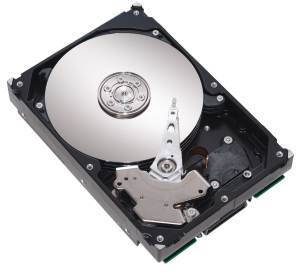
A hard disk, also called a hard disk drive or hard drive, is a storage device that contains one or more inflexible, circular platters that use magnetic particles to store data, instructions, and information. Traditionally, hard disks stored data using longitudinal recording, which aligned the magnetic particles horizontally. With perpendicular recording, hard disks align the particles vertically, making much greater storage capacities possible. The capacity of a hard disk is determined from whether it uses longitudinal or perpendicular recording, the number of platters it contains, and the composition of the magnetic coating on the platters. A platter is made of aluminum, glass, or ceramic and is coated with a material that allows items to be recorded magnetically on its surface. Each platter has two read/write heads, one for each side. The location of a read/write head often is referred to by its cylinder, which is the vertical section of a track that passes through all platters. Formatting is the process of dividing the disk into tracks and sectors. A track is a narrow recording band that forms a full circle on the surface of the disk. The disk’s storage locations are divided into pie-shaped sections, which break the tracks into small arcs called sectors. While the computer is running, the platters in the hard disk rotate at 5,400 to 15,000 revolutions per minute (rpm), which allows nearly instant access to all tracks and sectors on the platters. Transfer rate is the speed with which data, instructions, and information transfer to and from a storage device. Access time measures the amount of time it takes a storage device to locate an item on a storage medium, or the time required to deliver an item from memory to the processor.

3. What Is the Purpose of Network Attached Storage Devices, External and Removable Hard Disks, and Hard Disk Controllers?
A network attached storage (NAS) device is a server connected to a network with the sole purpose of providing storage. NAS devices often use a RAID configuration. An external hard disk is a separate freestanding hard disk that connects with a cable to a USB or FireWire port on the system unit or communicates wirelessly. External hard disks have storage capacities up to 4 TB and more. A removable hard disk can be inserted or removed from a built-in or external drive. Removable hard disks have storage capacities up to 1 TB. A disk controller consists of a special-purpose chip and electronic circuits that control the transfer of data, instructions, and information from a disk to and from the system bus and other components in a computer. A hard disk controller may be part of the hard disk on the motherboard, or it may be a separate adapter card inside the system unit.

4. What Are the Various Types of Flash Memory Storage?
Flash memory chips are a type of solid state media, which means they consist entirely of electronic components and contain no moving parts. A solid state drive (SSD) typically uses flash memory to store data, instructions, and information. A memory card is a removable flash memory device that you insert and remove from a slot in a computer, mobile device, or card reader/writer. Common memory cards include CompactFlash (CF), Secure Digital (SD), Secure Digital High Capacity (SDHC), microSD, microSDHC, xD Picture Card, Memory Stick, and Memory Stick Micro (M2). A USB flash drive, sometimes called a thumb drive, is a flash memory storage device that plugs in a port on a computer or mobiledevice. An ExpressCard module is a removable device that fits in an ExpressCard slot. ExpressCard modules can add memory, storage, communications, or other capabilities to a computer.

5. What Is Cloud Storage, and What Are Its Advantages?
Cloud storage is an Internet service that provides storage for computer users. Available for all sizes of users, with various degrees of storage services available for home and business users, cloud storage fees vary, depending on the user’s storage requirements. Advantages include accessing fi les on the Internet from any computer or device with Internet access; storing large audio, video, and graphics fi les on the Internet instantaneously; allowing others to access their fi les on the Internet; viewing time-critical data and images immediately; storing off-site backups of data; and providing data center functions.
6. What Are the Characteristics of Optical Discs?
An optical disc is a type of storage media that consists of a flat, round, portable disc made of metal, plastic, and lacquer that is written and read by a laser. Optical discs, which primarily store software, data, digital photos, movies, and music, contain microscopic pits (indentations) and lands (flat areas) in their middle layer. Optical discs commonly store items in a single track that spirals from the center of the disc to its edge. Like a hard disk, the single track is divided into evenly sized sectors.

7. How Are the Various Types of Optical Discs Different?
A CD-ROM, or compact disc read-only memory, is a type of optical disc that uses laser technology to store items. Users can read the contents of standard CD-ROMs but cannot erase or modify their contents. A CD-R (compact disc-recordable) is a multisession disc on which users can record their own items, such as text, graphics, and audio. Each part of a CD-R can be written on only one time, and the disc’s contents cannot be erased. A CD-RW (compact disc-rewritable) is an erasable disc that can be written on multiple times. An archive disc stores photos from an online photo center in the jpg fi le format. A Picture CD is a single-session CD-ROM that stores digital versions of fi lm using the jpg format at a lower resolution than an archive disc. A DVD-ROM (digital versatile disc-read-only memory or digital video disc-read-only memory) is a high capacity optical disc that you can read but not write on or erase. A newer, more expensive DVD format is Blu-ray Disc-ROM (BD-ROM), with higher capacity and better quality than standard DVDs. Many types of recordable and rewritable DVD formats are available. DVD-R and DVD+R are DVD-recordable formats. BD-R is a high-capacity DVD-recordable format. DVD-RW, DVD+RW, and DVD+RAM are rewritable DVD formats that allow users to erase and record multiple times. BD-RE is a high-capacity rewritable DVD format.

8. How Are Tape, Magnetic Stripe Cards, Smart Cards, Microfilm and Microfiche, and Enterprise Storage
Used?
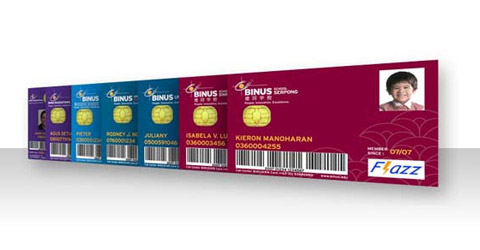
Binusian Flazz Card
Tape is a magnetically coated ribbon of plastic capable of storing large amounts of data and information at a low cost. A tape drive reads and writes data and information on tape. Business users utilize tape most often for long-term storage and backup. A magnetic stripe card is a credit card, entertainment card, bank card, or other similar card with a stripe that contains information identifying you and the card. A magnetic stripe card reader reads the information stored on the stripe. A smart card, which is similar in size to a credit or ATM card, stores data on a thin microprocessor embedded in the card. A smart card reader reads the information on the smart card and updates it if necessary. Microfilm is a 100- to 215-foot roll of film. Microfiche is a small sheet of film, usually about 4 x 6 inches. Microfilm and microfiche reduce the amount of paper firms must handle, are inexpensive, and have the longest life of any storage media. Enterprises use computers, servers, and networks to manage and store huge volumes of data and information. In an enterprise, some storage systems can provide more than 185 TB of storage, and optical disc servers hold hundreds of optical discs.

Assignment Discovering Computer 2011 - Chapter 6 Output

Assignment from Mr. Tri Djoko Wahjono, Ir., M.Sc.
Name : Tommy Hendrawan
NIM / Class : 1701309513 / 01PCT
Assignment : Discovering Computer 2011 - Chapter 6 Output

1. What Are the Four Types of Output?
Output is data that has been processed into a useful form. Computers process data (input) into information (output). Four categories of output are text, graphics, audio, and video. An output device is any hardware component that conveys information to one or more people. Commonly used output devices include display devices; printers; speakers, headphones, and earbuds; data projectors; interactive whiteboards; and force-feedback game controllers and tactile output.

2. What Are the Characteristics of Various Display Devices?
A display device, or simply display, is an output device that visually conveys text, graphics, and video information and consists of a screen and the components that produce the information on the screen. Desktop computers typically use a monitor as their display device; most mobile computers and devices integrate the display into the same physical case. LCD monitors, LCD screens, and plasma monitors are types of flat-panel displays. A flatpanel display is a lightweight display device with a shallow depth that typically uses LCD or gas plasma technology. An LCD monitor is a desktop monitor that uses a liquid crystal display to produce images. A plasma monitor is a display device that uses gas plasma technology, which substitutes a layer of gas for the liquid crystal material in an LCD monitor. A CRT monitor is a desktop monitor that contains a cathode-ray tube (CRT). CRT monitors take up more desk space and thus are not used much today.

3. What Factors Affect the Quality of an LCD monitor or LCD screen? 
http://ecx.images-amazon.com/images/I/81EHfiGQ0IL._SL1500_.jpg
The quality of an LCD monitor or LCD screen depends primarily on its resolution, response time, brightness, dot pitch, and contrast ratio. Resolution is the number of horizontal and vertical pixels in a display device; a higher resolution uses a greater number of pixels and provides a sharper image. Response time is the time in milliseconds that it takes to turn a pixel on or off. Brightness of an LCD monitor or LCD screen is measured in nits; the higher the nits, the brighter the image. A nit is a unit of visible light intensity equal to one candela per square meter. Dot pitch, or pixel pitch, is the distance in millimeters between pixels on a display device. Contrast ratio describes the difference in light intensity between the brightest white and darkest black that can be displayed on a monitor.

4. What Are the Various Ways to Print?
Users can print by connecting a computer to a printer with a cable that plugs in a port on the computer. Bluetooth printing uses radio waves to transmit output to a printer. With infrared printing, a computer or other device communicates with the printer via infrared light waves. Some digital cameras connect directly to a printer via a cable; others store images on memory cards that can be removed and inserted in the printer. Networked computers can communicate with the network printer via cables or wirelessly.

5. How Is a Nonimpact Printer Different from an Impact Printer?
A printer is an output device that produces text and graphics on a physical medium, such as paper. A nonimpact printer forms characters and graphics on a piece of paper without actually striking the paper. Some spray ink, while others use heat or pressure to create images. Commonly used nonimpact printers are ink-jet printers, photo printers, laser printers, thermal printers, mobile printers, label and postage printers, plotters, and large-format printers. An impact printer forms characters and graphics on a piece of paper by striking a mechanism against an inked ribbon that physically contacts the paper. These printers commonly produce near letter quality (NLQ) output, which is print quality slightly less clear than what is acceptable for business letters. Two commonly used types of impact printers are a dot-matrix printer and a line printer.

6. What Are Ink-Jet Printers, Photo Printers, Laser Printers, Multifunction Peripherals, Thermal Printers, Mobile Printers, Label and Postage Printers, and Plotters and Large-Format Printers?
An ink-jet printer is a type of nonimpact printer that forms characters and graphics by spraying tiny drops of liquid ink onto a piece of paper. One factor that influences the quality of an ink-jet printer is its resolution. Printer resolution is measured by the number of dots per inch (dpi) a printer can print.
A photo printer is a color printer that produces photo-lab-quality pictures. A laser printer is a high-speed, high-quality nonimpact printer that operates in a manner similar to a copy machine, creating images using a laser beam and powdered ink, called toner. Laser printers usually print at faster speeds than inkjet printers. A multifunction peripheral (MFP), or all-in-one device, is a single device that looks like a printer or a copy machine but provides the functionality of a printer, scanner, copy machine, and perhaps a fax machine. Some MFPs use color ink-jet printer technology; others include a black-and-white or color laser printer. The primary disadvantage of these devices is that if the device breaks down, you lose all four functions. A thermal printer generates images by pushing electrically heated pins against heat-sensitive paper. They are inexpensive, but the print quality is low and the images tend to fade over time. A mobile printer is a small, lightweight, battery-powered printer that allows a mobile user to print from a notebook computer or other mobile device. A label printer is a small printer that prints on an adhesive-type material that can be placed on a variety of items. Most label printers also print bar codes. A postage printer is a special type of label printer that has a built-in scale and prints postage stamps. Plotters are sophisticated printers used to produce high-quality drawings, such as blueprints, maps, and circuit diagrams. A large-format printer uses ink-jet technology on a large scale to create photo-realistic quality color prints.

7. What Are the Uses and Characteristics of Speakers, Headphones, and Earbuds?
http://coolmaterial.com/wp-content/uploads/2011/07/
Zumreed-Hybrid-Speaker-Headphones.jpg
Speakers, headphones, and earbuds are three commonly used audio output devices. An audio output device is a component of a computer that produces music, speech, or other sounds. Many personal computer users add stereo speakers to their computers, including game consoles and mobile devices, to generate higher-quality sounds. With headphones or earbuds, only the individual wearing the headphones or earbuds hears the sound from the computer. The difference is that headphones cover or are placed outside of the ear, whereas earbuds, or earphones, rest inside the ear canal. A headset is a device that functions as both headphones and a microphone, so that user’s hands are free for typing or other activities while listening to audio output.

8. What Are the Purposes and Features of Data Projectors, Interactive Whiteboards, and Force-Feedback Game Controllers and Mobile Devices?
A data projector is a device that takes the text and images displaying on a computer screen and projects them onto a larger screen so that an audience of people can see the image clearly. An LCD projector attaches directly to a computer and uses its own light source to display information shown on the computer screen. A digital light processing (DLP) projector uses tiny mirrors to reflect light. An interactive whiteboard is a touch-sensitive device, resembling a dry-erase board, which displays the image on a connected computer screen. Joysticks, wheels, gamepads, and motion- sensing game controllers are input devices used to control actions of a player or object in computer games, simulations, and video games. Today’s joysticks, wheels, gamepads, and motion- sensing game controllers also include force feedback, which is a technology that sends resistance to the device in response to actions of the user. Some input devices include tactile output that provides the user with a physical response from the device.

9. What Output Options Are Available for Physically Challenged Users?

Hearing-impaired users can instruct programs to display words instead of sound. The Magnifier in Windows enlarges text and other items in a window on the screen. Visually impaired users can enlarge items on the screen and change other settings, such as increasing the size or changing the color of text to make words easier to read. Blind users can work with voice output instead of a monitor via Windows Narrator. Another alternative is a Braille printer, which prints information in Braille on paper.

Assignment Discovering Computer 2011 - Chapter 5 Input

Assignment from Mr. Tri Djoko Wahjono, Ir., M.Sc.
Name : Tommy Hendrawan
NIM / Class : 1701309513 / 01PCT
Assignment : Discovering Computer 2011 - Chapter 5 Input


1. What Is Input, and What Are the Differences among a Program, a Command, and a User Response?
Input is any data or instructions entered into the memory of a computer. A program is a series of related instructions that tells a computer what tasks to perform and how to perform them. A command is an instruction that causes a program to perform a specific action. A user issues a user response by replying to a question displayed by a program to perform certain actions.

2. What Keys Are Commonly Found on Desktop Computer Keyboards, and How Do Keyboards for Mobile Computers and Devices Differ from Desktop Computer Keyboards?
A keyboard is an input device that contains keys users press to enter data and instructions into a computer. Computer keyboards have a typing area that includes letters of the alphabet, numbers, punctuation marks, and other basic keys. Most keyboards also have function keys programmed to issue commands; toggle keys that switch between two states when pressed; and keys used to move the insertion point, or cursor, on the screen. A gaming keyboard is a keyboard designed specifically for users who enjoy playing games on the computer. On notebook computers and some other mobile devices, the keyboard is built into the top of the system unit. To fi t in these mobile computers and devices, the keyboards usually are smaller and have fewer keys than desktop computer keyboards.

3. What Are Different Mouse Types, and How Do You Use a Mouse?
Source: http://www.build-your-own-computer.net/
image-files/input-devices-01.jpg
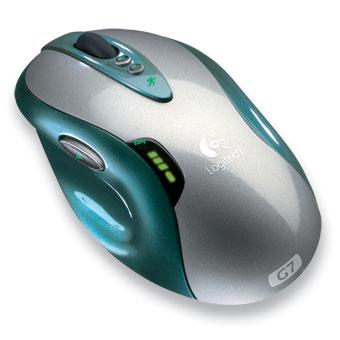
A mouse is a pointing device that fits under the palm of your hand. An optical mouse uses devices that emit and sense light to detect the mouse’s movement. A laser mouse uses a laser and is more expensive than an optical mouse. An air mouse allows you to control objects, media players, and slide shows by moving the mouse in predetermined directions through the air. A wireless mouse, or cordless mouse, transmits data using wireless technology. As you move a mouse, the mouse pointer moves on the screen. You then press a mouse button (usually the left) to click objects. Some programs support mouse gestures, where users can perform certain actions by holding a mouse button while moving the mouse in a particular pattern.


4. What Are the Various Types of Touch Screens, and How Does a Touch-Sensitive Pad Work?
A touch screen is a touch-sensitive display device. Touch screens that recognize multiple points of contact at the same time are known as multi-touch. Users interact with touch screens by touching areas of the screen such as pictures, numbers, letters, or locations identified on the screen. A kiosk is a freestanding computer that usually includes a touch screen. Microsoft Surface is a 30-inch tabletop display that allows one or more people to interact with the screen using their fingers or hands. A touch-sensitive pad is an input device that enables users to scroll through and play music, view pictures, watch videos or movies, adjust volume, and/or customize settings on a portable media player or other mobile device.

5. What Are the Various Types of Pen Input, and What Are Other Types of Input for Smart Phones?
Source: http://a.tgcdn.net/images/products/
zoom/ed01_jot_capacitive_touch_stylus.jpg
With pen input, you touch a stylus or digital pen on a flat surface, such as a screen on a monitor or mobile device, a signature capture pad, or a graphics tablet, to write, draw, or make selections. A stylus is a small metal or plastic device that looks like a tiny ink pen but uses pressure instead of ink. A digital pen, which is slightly larger than a stylus, features electronic erasers and programmable buttons. Handwriting recognition software is a program that translates handwritten letters and symbols into characters a computer or mobile device can process. A signature capture pad captures signatures written with a stylus or pen attached to a device. Some smart phones have digital cameras that have touch-sensitive pads. Others have a portable keyboard or optical keyboard built in.

6. What Are the Purposes of Gamepads, Joysticks and Wheels, Light Guns, Dance Pads, and Motion-Sensing Game Controllers?
A gamepad controls the movement and actions of players or objects in video games or computer games. A joystick is a handheld vertical lever that you move to control a simulated vehicle or player. A wheel is a steering-wheel-type device that you turn to simulate driving a vehicle. A light gun is used to shoot targets as you pull the trigger on the weapon. A dance pad is an electronic device, divided into panels, which users press with their feet. Motion sensing game controllers, such as the Wii Remote, guide on-screen elements by moving a handheld input device in predetermined directions through the air.

7. How Does Resolution Affect the Quality of a Picture Captured on a Digital Camera? 
A digital camera allows users to take pictures and store the photographed images digitally. Resolution is the number of horizontal and vertical pixels in a display device. The greater the number of pixels the camera uses to capture a picture, the better the quality of the picture. Thus, the higher the resolution, the better the picture quality, but the more expensive the camera.

8. How Are Voice Recognition, Web Cams, and Video Conferencing Used?
Source: https://blogger.googleusercontent.com/img/b/R29vZ2xl/AVvXsEg4L5bhd_DAMSfPeimZIfEjRDocQiEnQDnqmw71L5vfGpgEa43le47OsO-lvM0dBMs2gi2Qk9LlpmN0deTlemv4rLK_FruqHufXXIUHYOcSDctgoI_qbKDWH2JZW_-nQzdE-ZJmjCLnaS_A/s1600/Flagler-Beach-web-cam.jpg
Voice recognition, also called speech recognition, is the computer’s capability of distinguishing spoken words. A Web cam, also called a PC video camera, is a digital video camera that enables users to capture video and still images and then send or broadcast the images over the Internet. A video conference is a meeting between two or more geographically separated people who use a network or the Internet to transmit audio and video data.

9. How Do the Various Types of Scanners and Reading Devices Work?
A scanner, or optical scanner, is a light-sensing input device that reads printed text and graphics and translates the results into a form the computer can process. A flatbed scanner works in a manner similar to a copy machine except it creates a fi le of the document. An optical reader uses a light source to read characters, marks, and codes and converts them into digital data that a computer can process. Optical character recognition (OCR) reads characters from ordinary documents. Optical mark recognition (OMR) reads hand-drawn marks such as small circles or rectangles. A bar code reader, or barcode scanner, is an optical reader that uses laser beams to read a bar code, or identification code. RFID (radio frequency identification) uses radio signals to communicate with an embedded tag placed in or attached to an object, an animal, or a person. A magnetic stripe card reader, also called a magstripe reader, reads the magnetic stripe on the back of credit cards and other similar cards. MICR (magnetic-ink character recognition) reads text printed with magnetized ink.

10. What Are Various Biometric Devices?
A biometric device translates a personal characteristic into digital code that is compared with a digital code stored in the computer to identify an individual. A fingerprint reader captures curves and indentations of a fingerprint. A face recognition system captures a live face image and compares it with a stored image. A hand geometry system measures the shape and size of a hand. A voice verification system compares live speech with a stored voice pattern. A signature verification system recognizes the shape of a signature. An iris recognition system reads patterns in the iris of the eye. Retinal scanners scan patterns of blood vessels in the back of the retina.

11. How Do POS Terminals, Automated Teller Machines, and DVD Kiosks Work?
A terminal is a computer, usually with limited processing power, that enables users to send data to and/or receive information from a host computer. POS terminals, ATMs, and DVD kiosks are special-purpose terminals. A POS (point-of-sale) terminal records purchases, processes credit or debit cards, and updates inventory. An automated teller machine (ATM) is a self-service banking machine that connects to a host computer through a network. A DVD kiosk is a self-service DVD rental machine that connects to a host computer through a network.

12. What Are Alternative Input Devices for Physically Challenged Users?

Voice recognition is ideal for visually impaired users. A keyguard is a plate placed over the keyboard that allows users with limited hand mobility to rest their hands and press only one key at a time. Keyboards with larger keys or an on-screen keyboard displayed on a user’s screen also are available. A small trackball or a head-mounted pointer helps users with limited hand movement to control the pointer or insertion point. Two developments in the prototype stage are gesture recognition and computerized implant devices.

Senin, 09 Desember 2013

Assignment Discovering Computer 2011 - Chapter 4 The Components of The System Unit

Assignment from Mr. Tri Djoko Wahjono, Ir., M.Sc.
Name : Tommy Hendrawan
NIM / Class : 1701309513 / 01PCT
Assignment : Discovering Computer 2011 - Chapter 4 The Components of The System Unit

1. How Are Various Styles of System Units on Desktop Computers, Notebook Computers, and Mobile Devices Different? 
The system unit is a case that contains electronic components of the computer used to process data. On desktop personal computers, most storage devices also are part of the system unit. On most notebook computers, including netbooks, the keyboard and pointing device often occupy the area on top of the system unit, and the display attaches to the system unit by hinges. The location of the system unit on a Tablet PC varies, depending on the design of the Tablet PC. On mobile computers and devices, the display often is built into the system unit.
With game consoles, the input and output devices, such as controllers and a television, reside outside the system unit. On handheld game consoles, portable media players, and digital cameras by contrast, the packaging around the system unit houses the input devices and display.

2. What Are Chips, Adapter Cards, and Other Components of the Motherboard? 
The motherboard, sometimes called a system board, is the main circuit board of the system unit. The motherboard contains many electronic components including a processor chip, memory chips, expansion slots, and adapter cards. A computer chip is a small piece of semiconducting material, usually silicon, on which integrated circuits are etched. Expansion slots hold adapter cards that provide connections and functions not built into the motherboard.

3. What Are the Control Unit and Arithmetic Logic Unit Components of a Processor, and What Are the Four Steps in a Machine Cycle? 
The processor, also called the central processing unit (CPU), interprets and carries out the basic instructions that operate a computer. Processors contain a control unit that directs and coordinates most of the operations in the computer and an arithmetic logic unit (ALU) that performs arithmetic, comparison, and other operations. The machine cycle is a set of four basic operations — fetching, decoding, executing, and storing — that the processor repeats for every instruction.

4. What Are the Characteristics of Various Personal Computer Processors, and How Are Processors
Cooled? 
A multi-core processor is a single chip with two or more separate processor cores. Two common multi-core processors are dual-core and quad-core. A dual-core processor is a chip that contains two separate processor cores. A quad-core processor is a chip with four or more separate processor cores. Intel produces the Core processor family for high- performance personal computers, the Pentium and Celeron processor families for basic personal computers, and the Xeon and Itanium processor families for workstations and low-end servers.
AMD manufactures Intel-compatible processors, which have an internal design similar to Intel processors. Some devices have a system-on-a-chip processor that integrates the functions of a processor, memory, and a video card on a single chip. Heat sinks/pipes and liquid cooling technologies are used to dissipate processor heat. A heat sink is a small ceramic or metal component that absorbs and disperses heat. A smaller device called a heat pipe cools processors in notebook computers, including netbooks and Tablet PCs. Some computers use liquid cooling technology, which uses a continuous flow of fluid(s) to transfer heated fluid away from the processor.

5. What Is a Bit, and How Does a Series of Bits Represent Data? 
Most computers are digital and recognize only two discrete states: off and on. To represent these states, computers use the binary system, which is a number system that has just two unique digits — 0 (for off) and 1 (for on) — called bits. A bit (short for binary digit), is the smallest unit of data a computer can process. Grouped together as a unit, 8 bits form a byte, which provides enough different combinations of 0s and 1s to represent 256 individual characters. The combinations are defined by patterns, called coding schemes, such as ASCII and Unicode.

6. How Do Program Instructions Transfer in and out of Memory? 
When a program starts, the program’s instructions and data are transferred to memory from storage devices. The program and operating system instructions are in memory, and the program’s window appears on the screen. When you quit the program, the program instructions are removed from memory, and the program no longer is displayed on the screen. 7. What Are the Various Types of Memory? Memory usually consists of one or more chips on the motherboard or some other circuit board in the computer. The system unit contains volatile and nonvolatile memory. Volatile memory loses its contents when the computer’s power is turned off. Nonvolatile memory does not lose its contents when the computer’s power is turned off. RAM is the most common type of volatile memory. ROM, flash memory, and CMOS are examples of nonvolatile memory. RAM (random access memory), also called main memory, consists of memory chips that can be read from and written to by the processor and other devices. ROM (read-only memory) refers to memory chips storing permanent data and instructions that usually cannot be modified. Flash memory can be erased electronically and rewritten. CMOS (complementary metal-oxide semiconductor) technology uses battery power to retain information even when the power to the computer is turned off.

8. What Are the Purpose and Types of Expansion Slots and Adapter Cards, and What Are the Different Slots for Flash Memory Devices? 
An expansion slot is a socket on the motherboard that can hold an adapter card. An adapter card, sometimes called an expansion card, is a circuit board that enhances functions of a component of the system unit and/or provides a connection to a peripheral. A sound card enhances the sound-generating capabilities of a personal computer. A video card, also called a graphics card, converts computer output into a video signal that displays an image on the screen. A memory card is a removable fl ash memory device that you insert and remove from a slot in a personal computer, a game console, a mobile device, or card reader/writer. A USB flash drive plugs in a USB port on a computer or mobile device. A PC Card slot or an Express Card slot holds a PC Card or Express Card module.

9. What Is the Difference between a Port and a Connector, and What Are the Differences among the Various Types of Ports? 
A port is the point at which a peripheral attaches to or communicates a system unit so that it can send data to or receive information from the computer. A connector joins a cable to a port. A USB port, short for universal serial bus port, can connect up to 127 different peripherals together with a single connector. A FireWire port can connect multiple types of devices that require faster data transmission speeds. Bluetooth technology uses radio waves to transfer data between two devices. A SCSI port attaches the system unit to SCSI peripherals, such as disk drives and printers. An eSATA port connects an external SATA hard disk to a computer. An IrDA port allows wireless devices to transmit signals to a computer via infrared light waves. A serial port transmits data one bit at a time. A MIDI port connects the system unit to a musical instrument.

10. What Are the Types of Buses in a Computer? 
A bus is an electrical channel along which bits transfer within the circuitry of a computer, allowing devices both inside and attached to the system unit to communicate. The data bus transfers actual data, and the address bus transfers information about where the data should reside in memory. The size of a bus, called the bus width, determines the number of bits that the computer can transmit at one time. The larger the bus width, the faster the computer transfers data. A computer has a system bus, or front side bus (FSB); possibly a backside bus (BSB); and an expansion bus.

11. What Is the Purpose of a Power Supply, and How Does It Keep Cool? 
A power supply is the component of the system unit that converts wall outlet AC power into DC power for the computer to use. A fan built directly into the power supply keeps it cool. Some have variable speed fans, and many newer computers have additional fans near components in the system unit. Notebook computers, including netbooks and Tablet PCs, can be placed on a cooling pad to help disperse heat.

12. How Do You Clean a System Unit on a Personal Computer or Mobile Device? 
Before cleaning the exterior of a computer or mobile device, turn it off, and if necessary, unplug it from the electrical outlet, remove the battery, and disconnect all cables from the ports. Use compressed air to blow away dirt from any openings on the case, such as drives, slots, ports, and fan vents. Use an anti-static wipe to clean the exterior of the case and a cleaning solution on a soft cloth to clean the screen. While working inside the case, be sure to wear an anti-static wristband. If you do not feel comfortable cleaning the inside of the case, you can have a professional or Computer Company clean it for you. Use a vacuum and compressed air to remove dust inside the case.

Senin, 14 Oktober 2013

Assignment Discovering Computer 2011 - Chapter 3 Application Software

Assignment from Mr. Tri Djoko Wahjono, Ir., M.Sc.
Name : Tommy Hendrawan
NIM / Class : 1701309513 / 01PCT

Assignment : Discovering Computer 2011 - Chapter 3 Application Software


True/False Mark T for True and F for False.

1. F
2. F
3. F
4. T
5. T
6. T
7. T
8. F
9. T
10. T
11. T
12. F
Multiple Choice

1. A
2. A
3. B
4. C
5. C
6. B
7. C
8. B
Matching

1. I
2. E
3. J
4. B
5. D
6. L
7. A
8. G
9. K
10. C

Short Answer
1. Describe some types of utility programs. ____________ What is malware? ____________
Utility software is system software designed to help analyze, configure, optimize or maintain a computer.
Anti-virus utilities scan for computer viruses.
Archivers output a stream or a single file when provided with a directory or a set of files. Archive utilities, unlike archive suites, usually do not include compression or encryption capabilities. Some archive utilities may even have a separate un-archive utility for the reverse operation.
Backup software can make copies of all information stored on a disk and restore either the entire disk (e.g. in an event of disk failure) or selected files (e.g. in an event of accidental deletion).
Clipboard managers expand the clipboard functionality of an operating system .
Cryptographic utilities encrypt and decrypt streams and files.
Data compression utilities output a shorter stream or a smaller file when provided with a stream or file.

Malware is  software used to disrupt computer operation, gather sensitive information, or gain access to private computer systems. It can appear in the form of code, scripts, active content, and other software

2. What are the features of presentation software? ____________ What types of media might a person use to enhance a presentation? ____________
A presentation program is supposed to help both: the speaker with an easier access to his ideas and the participants with visual information which complements the talk. There are many different types of presentations including professional (work-related), education, entertainment, and for general communication. Presentation programs can either supplement or replace the use of older visualaid technology, such as Pamphlets, handouts, chalkboards, flip charts, posters, slides and overhead transparencies. Text, graphics, movies, and other objects are positioned on individual pages or "slides" or "foils". The "slide" analogy is a reference to the slide projector, a device that has become somewhat obsolete due to the use of presentation software. Slides can be printed, or (more usually) displayed on-screen and navigated through at the command of the presenter. Transitions between slides can be animated in a variety of ways, as can the emergence of elements on a slide itself. Typically a presentation has many constraints and the most important being the limited time to present consistent information.

Essentially, the most common ways to enhance a presentation involve effective use of Audio and Visual media. Since people receive information mostly through the eyes and secondarily through hearing, well-put audio-visual presentations are usually successful. You could use visual media, a chalkboard, an overhead projector, or video to enhance a presentation.

3. How is travel and mapping software used? ____________ What are some examples of reference software?____________
Users to view maps, determine route directions, and locate points of interest and also calculate mileage, time, and expense. 

Examples of reference software : dictionary, translation dictionary, encyclopedia, thesaurus, and atlas

4. What is computer-based training (CBT)? ____________ List a few examples of CBT usage. ____________
The use of information technology for any assessment-related activity. This definition embraces a wide range of student activity ranging from the use of a word processor to on-screen testing. Due to its obvious similarity to e-learning, the term e-assessment is becoming widely used as a generic term to describe the use of computers within the assessment process. Specific types of e-assessment include computerized adaptive testing and computerized classification testing.
E-assessment can be used to assess cognitive and practical abilities. Cognitive abilities are assessed using e-testing software, while practical abilities are assessed using e-portfolios or simulation software.
Example : Cambridge English COMPUTER-BASED exams

5. Describe how many Web sites utilize Web-based training. ____________ What are some ways that e-learning enhances communications? ____________
Web-based training (WBT) is a type of CBT (computer-based training) that uses Internet technology and consists of application software on the Web.

There are video conferencing, e-mail, blogs, wikis, newsgroups, chat rooms, and groupware

Rabu, 09 Oktober 2013

Assignment Discovering Computer 2011 - Chapter 2 The Internet and World Wide Web

Assignment from Mr. Tri Djoko Wahjono, Ir., M.Sc.
Name : Tommy Hendrawan
NIM / Class : 1701309513 / 01PCT
Assignment : Discovering Computer 2011 - Chapter 2 The Internet and World Wide Web

1. How Did the Internet Evolve? 
The history of the Internet began with the development of electronic computers in the 1950s. The public was first introduced to the concepts that would lead to the Internet when a message was sent over the ARPANet from computer science Professor Leonard Kleinrock's laboratory at University of California, Los Angeles (UCLA), after the second piece of network equipment was installed at Stanford Research Institute (SRI). Packet switched networks such as ARPANET, Mark I at NPL in the UK, CYCLADES, Merit Network, Tymnet, and Telenet, were developed in the late 1960s and early 1970s using a variety of protocols. The ARPANET in particular led to the development of protocols for internetworking, in which multiple separate networks could be joined together into a network of networks.
In 1982, the Internet protocol suite (TCP/IP) was standardized, and consequently, the concept of a world-wide network of interconnected TCP/IP networks, called the Internet, was introduced. Access to the ARPANET was expanded in 1981 when the National Science Foundation (NSF) developed the Computer Science Network (CSNET) and again in 1986 when NSFNET provided access to supercomputer sites in the United States from research and education organizations. Commercial Internet service providers (ISPs) began to emerge in the late 1980s and early 1990s. The ARPANET was decommissioned in 1990. The Internet was commercialized in 1995 when NSFNET was decommissioned, removing the last restrictions on the use of the Internet to carry commercial traffic.
Since the mid-1990s, the Internet has had a revolutionary impact on culture and commerce, including the rise of near-instant communication by electronic mail, instant messaging, Voice over Internet Protocol (VoIP) "phone calls", two-way interactive video calls, and the World Wide Web with its discussion forums, blogs, social networking, and online shopping sites. The research and education community continues to develop and use advanced networks such as NSF's very high speed Backbone Network Service (vBNS), Internet2, and National LambdaRail. Increasing amounts of data are transmitted at higher and higher speeds over fiber optic networks operating at 1-Gbit/s, 10-Gbit/s, or more. The Internet's takeover over the global communication landscape was almost instant in historical terms: it only communicated 1% of the information flowing through two-way telecommunications networks in the year 1993, already 51% by 2000, and more than 97% of the telecommunicated information by 2007.Today the Internet continues to grow, driven by ever greater amounts of online information, commerce, entertainment, and social networking.

2. What Are the Various Types of Internet Connections, and What Are the Differences between Broadband and Dial-Up Connections?  
Many home and small business users opt to connect to the Internet via high-speed broadband Internet connections. 
  • DSL (digital subscriber line) provides Internet connections using regular copper telephone lines. Cable Internet service provides high-speed Internet access through the cable television network via a cable modem. 
  • Fiber to the Premises (FTTP) uses fiber-optic cable to provide high-speed Internet access. 
  • Fixed wireless provides high-speed Internet connections using a dish-shaped antenna to communicate via radio signals. 
  • A cellular radio network offers high-speed Internet connections to devices with built-in compatible technology or computers with wireless modems. A Wi-Fi network uses radio signals. 
  • Satellite Internet service provides high-speed Internet connections via satellite. 
  • Some homes and small businesses connect to the Internet with dial-up access. Dial-up access, which is slower-speed technology, takes place when the modem in your computer connects to the Internet via a standard telephone line that transmits data and information using an analog (continuous wave) pattern.

3. What Are the Types of Internet Access Providers? 
An access provider is a business that provides access to the Internet free or for a fee. An ISP (Internet service provider) is a regional or national access provider. An online service provider (OSP) provides Internet access in addition to members-only features. A wireless Internet service provider provides wireless Internet access to desktop and notebook computers and mobile devices with built-in wireless capabilities (such as Wi-Fi) or to computers using wireless modems or wireless access devices.

4. What Is the Purpose of an IP Address, and What Is Its Relationship to a Domain Name? 
An IP address (Internet Protocol address) is a number that uniquely identify each computer or device connected to the Internet. The Internet relies on IP addresses to send data to computers at specific locations. The IP address usually consists of four groups of numbers, each separated by a period. A domain name is the text version of an IP address.
Source : http://wiki.bitnami.com/@api/deki/files/370/=manage.png


5. What Is the Purpose of a Web Browser, and What Are the Components of a Web Address? 
A Web browser, or browser, is application software that allows users to access and view Web pages or access Web 2.0 programs. With an Internet connection established, you start a Web browser, which then retrieves and displays a starting Web page, sometimes called a home page. The home page usually contains links to other Web pages. A link, short for hyperlink, is a built-in connection to another related Web page or part of a Web page. A Web page has a unique address called a URL (Uniform Resource Locator), or Web address. A Web address consists of a protocol, a domain name, and sometimes the path to a specific Web page or location on a Web page.

6. How Do You Use a Search Engine to Search for Information on the Web, and What Is the Difference between a Search Engine and a Subject Directory?
A search engine is a program that finds Web sites, Web pages, images, videos, news, maps, and other information related to a specific topic. To use a search engine, you enter a word or phrase, called search text or a search query that describes the item you want to find. Each word in the search text is known as a keyword. The search engine displays a list of hits. When clicked, each hit subject set of categories links, you to display pages about desired topic. Displays an associated Web site or Web page. A directory classifies Web pages in an organized categories and related subcategories. By clicking u move through levels to display a list of Web out a topic.

7. What Are the Types of Web Sites? 
A portal is a Website that offers a variety of Internet services from a single location. A news Web site contains newsworthy material. An informational Web site contains factual information. A business/marketing Web site promotes or sells products or services. A blog, short for Weblog, is an informal Web site consisting of time-stamped articles, or posts, in a diary or journal format, usually listed in reverse chronological order. A wiki is a collaborative Web site that allows users to create, add to, modify, or delete the Web site content via their Web browser. An online social network, or social networking Web site, encourages members to share their interests, ideas, stories, photos, music, and videos with other registered users. An educational Web site offers avenues for teaching and learning. An entertainment Web site provides an interactive and engaging environment. An advocacy Web site describes a cause, opinion, or idea. A Web application, or Web app, is a Web site that allows users to access and interact with software through a Web browser or any computer or device connected to the Internet. A content aggregator is a business that gathers and organizes Web content and then distributes, or feeds, the content to subscribers for free or a fee. A personal Web site is maintained by a private individual or family.

8. How Do Web Pages Use Graphics, Animation, Audio, Video, Virtual Reality, and Plug-Ins? 
Some Web pages use multimedia, which combines text with graphics, animation, audio, video, and/or virtual reality. A graphic is a digital representation of non-text information such as a drawing, chart, or photo. Animation is the appearance of motion created by displaying a series of still images in sequence. Audio includes music, speech, or any other sound. Video consists of full-motion images played back at various speeds. Virtual reality (VR) is the use of computers to simulate an environment that appears as three-dimensional space. A plug-in, or add-on, is a program that extends a browser’s capability to display multimedia elements.

9. What Are the Steps Required for Web Publishing?
Web publishing is the development and maintenance of Web pages. The five major steps to Web publishing are: 
(1) plan a Web site, 
(2) analyze and design a Web site, 
(3) create a Web site, 
(4) deploy a Web site, and 
(5) maintain a Web site.

10. What Are the Types of E-Commerce? 
E-commerce, short for electronic commerce, is a business transaction that occurs over an electronic network such as the Internet. Business-to-consumer (B2C) e-commerce consists of the sale of goods and services to the general public. Consumer to consumer (C2C) e-commerce occurs when one consumer sells directly to another, such as in an online auction. Business-to-business (B2B) e-commerce takes place between businesses that exchange goods and services.
Source : http://www.superiorcommerce.net/images/ecommerce.jpg


11. How Do E-Mail, Mailing Lists, Instant Messaging, Chat Rooms, VoIP, Newsgroups and Message Boards, and FTP Work? 
E-mail (short for electronic mail) is the transmission of messages and files via a computer network. A mailing list is a group of e-mail names and addresses given a single name, so that everyone on the list receives a message sent to the list. Instant messaging (IM) is a real-time Internet communications service that notifies you when one or more people are online. A chat room is a location on an Internet server that permits users to conduct real-time typed conversations. VoIP (Voice over IP, or Internet Protocol), also called Internet telephony, enables users to speak to other users over the Internet, instead of the public switched telephone network. A newsgroup is an online area in which users have written discussions about a particular subject. A message board is a Web-based type of discussion group that is easier to use than a newsgroup. FTP (File Transfer Protocol) is an Internet standard that permits file uploading and downloading with other computers on the Internet.

12. What Are the Rules of Netiquette? 
Netiquette, which is short for Internet etiquette, is the code of acceptable behaviors users should follow while on the Internet. Netiquette rules include: keep messages short, be polite, avoid sending flames or spam, use emoticons and acronyms, clearly identify a spoiler, read the FAQ, do not assume material is accurate or up-to-date, and never read someone’s private e-mail.
Source : https://blogger.googleusercontent.com/img/b/R29vZ2xl/AVvXsEgwfOTLC6ECIF9knSonCTEbscccLmibh_ZLSPeHXNi1YOCPT-9ZMgewxjhTyCMVaz4rfsS8aBgRiPlxAsfeppUKh2cb-ejF4Nqrb7A05lzdQDZWGe-tycOF6wK4xn8tyQacLWlMJFZAUM7b/s1600/Core_rules_of_netiquette.png

Selasa, 01 Oktober 2013

Assignment Discovering Computer 2011 - Chapter 1 Introduction to Computer

Assignment from Mr. Tri Djoko Wahjono, Ir., M.Sc.
Name : Tommy Hendrawan
NIM / Class : 1701309513 / 01PCT
Assignment : Discovering Computer 2011 - Chapter 1 Introduction to Computer

1. Why Is Computer Literacy Vital in Today’s World?
Computer literacy, or digital literacy, involves having current knowledge and understanding of computers and their uses. The requirements that determine computer literacy change as technology changes. As computers become more a part of everyday life, like when we calling someone with our smartphones, reading comics on the internet, using e-book to support stop using paper and etc. most of people believe that to know Computer Literacy is necessary and even vital for success life.

2. What Is a Computer, and What Is the Relationship between Data and Information? 
A computer is an electronic device, operating under the control of instructions stored in its own memory, that can accept data, process the data according to specified rules, produce results, and store the results for future use. Data is a collection of unprocessed items, which can include text, numbers, images, audio, and video. Information conveys meaning and is useful to people. So, the result of processing Data which is not prepared yet to serve for users called Information.

3. List and Describe the Five Components of a Computer.
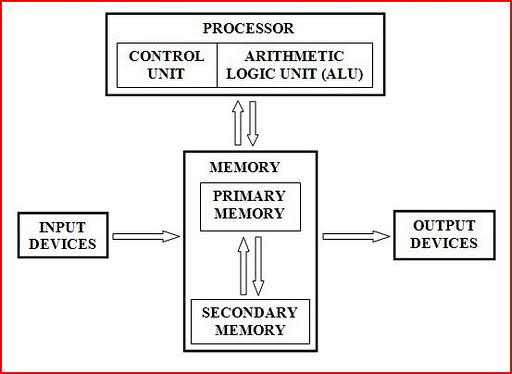
The electric, electronic, and mechanical components of a computer, or hardware, include input devices, output devices, a system unit, storage devices, and communications devices. An input device allows you to enter data or instructions into a computer. An output device conveys information to one or more people. The system unit is a case that contains the electronic components of a computer that are used to process data. A storage device records and/or retrieves items to and from storage media. A communications device enables a computer to send and receive data, instructions, and information to and from one or more computers.
www.dekstopclass.com

4. What Are the Advantages and Disadvantages That Users Experience When Working with Computers?
A user is anyone who communicates with a computer or utilizes the information it generates. Computers have the advantages of speed, reliability, consistency, storage, and communications. They perform operations at incredibly fast speeds, are dependable and reliable, consistently generate error-free results, can store enormous amounts of data, can share processing with other computers and get a lot of entertainment. 
Disadvantages of computers relate to health risks, the violation of privacy, public safety, the impact on the labor force, and the impact on the environment.

5. What Is a Network, and What Are Its Benefits?
A network is a collection of computers and devices connected together, often wirelessly, via communications devices and transmission media. Networks allow computers to share resources, such as hardware, software, data, and information. Sharing resources saves time and money. The world’s largest computer network is the Internet.

6. How Are the Internet and World Wide Web Used?
The Internet is a worldwide collection of networks that connects millions of businesses, government agencies, educational institutions, and individuals. People use the Internet to communicate with and meet other people; conduct research and access information and news; shop for goods and services; bank and invest; participate in online training; engage in entertaining activities; download music and videos; share information, photos, and videos; and access and interact with Web applications. The Web, short for World Wide Web, is a global library of documents containing information that is available to anyone connected to the Internet.


7. How Is System Software Different from Application Software? 
Software, also called a program, is a series of related instructions, organized for a common purpose, that tells the computer what actions to perform and how to perform them. System software consists of the programs that control or maintain the operations of a computer and its devices. Two types of system software are the operating system, which coordinates activities among computer hardware devices, and utility programs, which perform maintenance-type tasks usually related to managing a computer, its devices, or its programs. Application software consists of programs designed to make users more productive and/or assists them with personal tasks. Popular application software includes Web browsers, word processing software, spreadsheet software, database software, and presentation software.

8. What Are the Differences among the Types, Sizes, and Functions in the Following Categories: Personal Computers (Desktop), Mobile Computers and Mobile Devices, Game Consoles, Servers, Mainframes, Supercomputers, and Embedded Computers? 
Industry experts typically classify computers in seven categories: personal computers (desktop), mobile computers and mobile devices, game consoles, servers, mainframes, supercomputers, and embedded computers. A personal computer is a computer that can perform all of its input, processing, output, and storage activities by itself.
A mobile computer is a personal computer you can carry from place to place, and a mobile device is a computing device small enough to hold in your hand. A game console is a mobile computing device designed for single-player or multiplayer video games. A server controls access to the hardware, software, and other resources on a network and provides a centralized storage area for programs, data, and information. A mainframe is a large, expensive, powerful computer that can handle hundreds or thousands of connected users simultaneously and can store tremendous amounts of data, instructions, and information. A supercomputer is the fastest, most powerful, and most expensive computer and is used for applications requiring complex, sophisticated mathematical calculations. An embedded computer is a special-purpose computer that functions as a component in a larger product.
www.alibaba.com

9. What Is the Role of Each Element in an Information System? 
An information system combines hardware, software, data, people, and procedures to produce timely and useful information. People in an information technology (IT) department develop procedures for processing data. Following these procedures, people use hardware and software to enter the data into a computer. Software processes the data and directs the computer hardware to store changes on storage media
and produce information in a desired form.

10. How Do the Various Types of Computer Users Interact with Computers? 
Computer users can be separated small office/home office user, mobile user, power user, and enterprise user. A home user is a family member who uses a computer for a variety of reasons, such as budgeting and personal financial management, Web access, communications, and entertainment. A small office/home office (SOHO) includes any company with fewer than 50 employees, as well as the self-employed individual who works from home. SOHO users access the Internet to look up information and use basic business software and sometimes industry-specific software. Mobile users are employees and students who work on a computer while away from a main office, home office, or school. A power user uses a workstation or other powerful computer to work with industry-specific software. Power users exist in all types of businesses. An enterprise user works in or interacts with a company with many employees and uses a computer and computer network that processes high volumes of transactions in a single day.
fun.kdelchev.com

11. How Does Society Use Computers in Education, Finance, Government, Health Care, Science, Publishing, Travel, and Manufacturing?
In education, students use computers and software to assist with learning or take distance learning classes. In finance, people use computers for online banking and online investing. Government offices have Web sites to provide citizens with up-to-date information, and government employees use computers as part of their daily routines. 
In health care, computers are used to maintain patient records, monitor patients, deliver medication to nurse stations via robots, assist with medical tests and research, correspond with patients, file insurance claims, provide greater precision during operations, and as implants. All branches of science use computers to assist with collecting, analyzing, and modeling data and to communicate with colleagues around the world. Publishers use computers to assist in designing pages and make the content of their works available online. Many vehicles use some type of online navigation system to help people travel more quickly and safely. Manufacturers use computer-aided manufacturing (CAM) to assist with manufacturing processes.